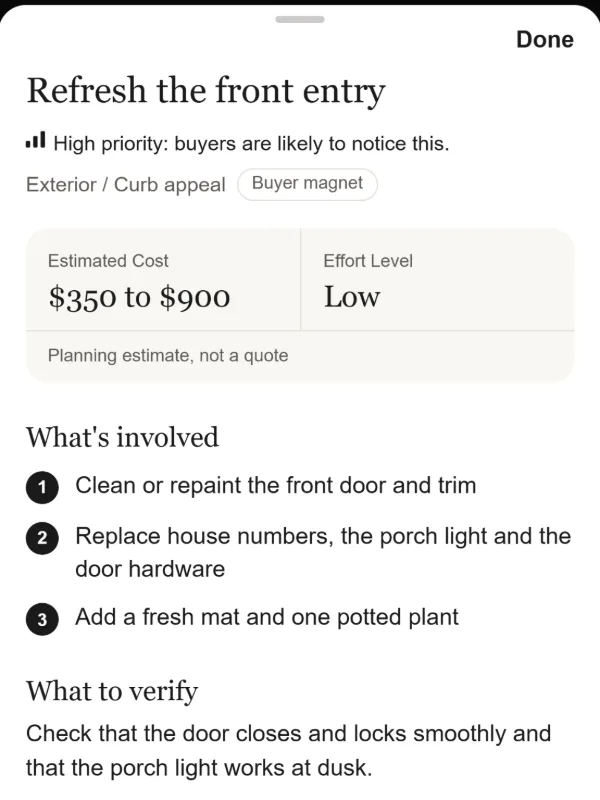
Every fix, opened up
See the steps, how much effort a fix takes, what to verify, and when not to overdo it. Where Curb can estimate one, you get a planning cost range. It is an estimate to help you budget, not a quote.
Answer nine questions about your home and Curb builds your prep plan: up to 12 fixes marked by priority, the projects you may not need, which pro to call first, and a Sell-Ready Date to work toward.
Free to start, no account needed. The iPhone app is a free download, or start right here on the web.
Screen from an example plan. Cost ranges are planning estimates, not quotes.
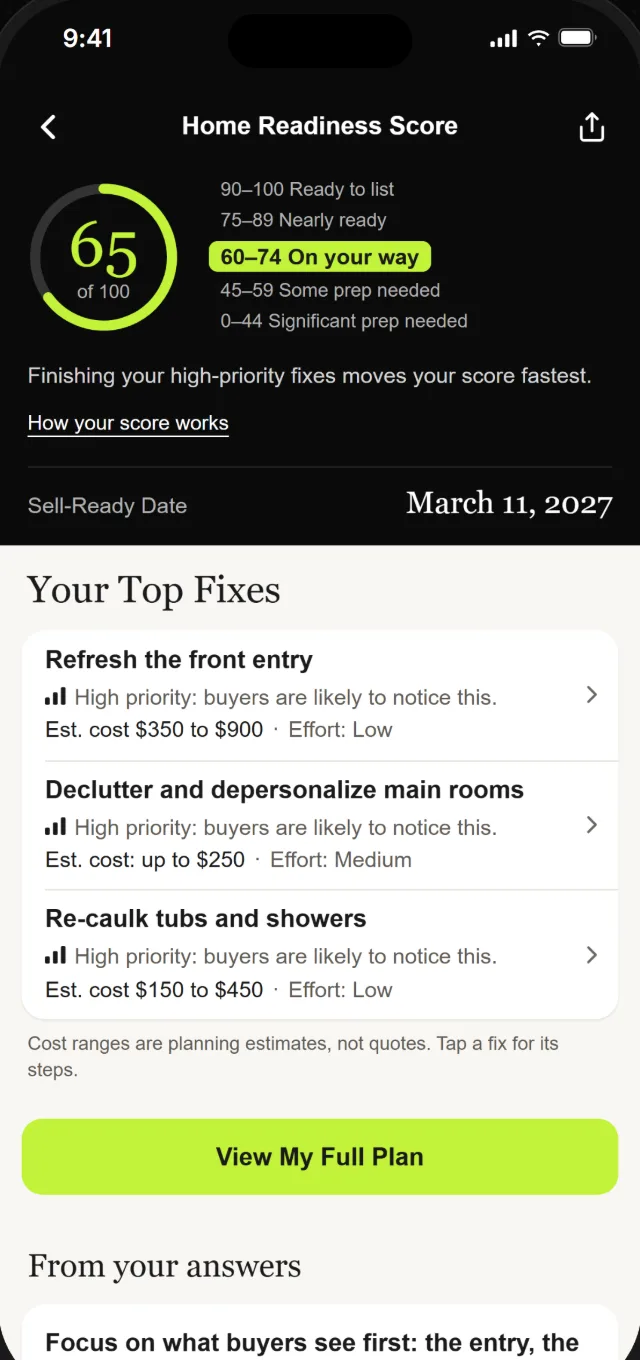
Curb sorts the work by priority and names the projects you may not need, so your time and budget go where buyers are likely to look first.
Fix first
High priority: buyers are likely to notice this. Clean or repaint the door and trim, then replace the house numbers, the porch light and the door hardware.
Skip Curb Pro
Your kitchen is sound. Better move: new cabinet pulls, a current faucet, brighter bulbs and clear counters.
Call first Curb Pro
One visit can knock out the caulk, the sticking doors, the drips and the hardware swaps. Ask: "Can you quote my small fixes list as one visit?"
From an example plan. Yours is built from your own answers, and from your photos if you add them.
Your home's type, location and condition, your timeline, priorities, rooms and budget. Two more are optional: what you have already handled and what you think buyers will notice.
Snap a few rooms and Curb notes what buyers may notice first. Nothing is sent unless you add photos and choose to continue, and Curb does not store your photos.
Your Home Readiness Score from 0 to 100, a Sell-Ready Date, and up to 12 fixes, each marked high, medium or low priority.
Mark a fix done and your score rises. This Week's Focus picks two fixes to start with, and you can re-score anytime.
Real screens from Curb, using an example home.
See the steps, how much effort a fix takes, what to verify, and when not to overdo it. Where Curb can estimate one, you get a planning cost range. It is an estimate to help you budget, not a quote.
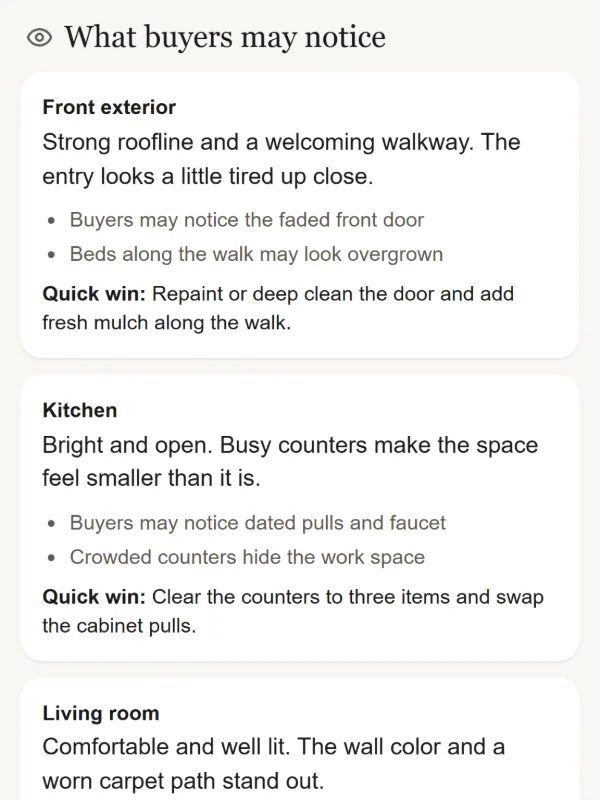
Add photos of a few rooms and Curb writes room-by-room notes on what buyers may notice, with a quick win for each. Photos are optional. Curb does not store them; only the text notes are saved with your plan.
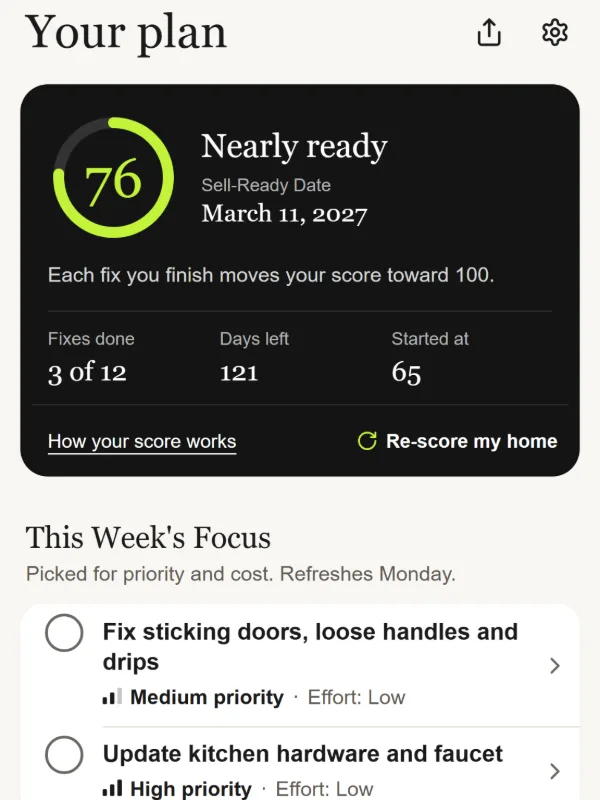
Your score starts from the condition you chose and rises as you finish fixes, with higher-priority fixes counting more. It is Curb's own progress measure, not an appraisal or a price prediction.
A target date to be list-ready, based on your timeline, your priority and your home's condition. Re-score anytime for an updated plan and date.
Send your partner a private link to your plan. They see your progress, Sell-Ready Date, and fix list in any browser. No app required to view.
Start without an account. Curb does not ask for your GPS location or your contacts. Built for homeowners 3 to 18 months from listing.
Your score, your Sell-Ready Date and your first three fixes are free. Curb Pro opens the rest.
Curb Pro Monthly: 7-day free trial for eligible new subscribers, then $9.99/month. It renews automatically until you cancel. Cancel anytime: on iPhone in your Apple ID subscriptions, on the web from Settings in Curb.
Buying on the web? Create a free Curb account first, so Curb Pro stays with you.
I'm Maureen. I built Curb because getting a home ready to sell shouldn't mean guessing what is worth the money. Curb gives you a clear, prioritized plan, what to fix, what to skip, and who to call first, so you stay in control of your home, your budget, and your timeline.
Maureen Cappallo
Founder, Curb
No. Your Home Readiness Score is Curb's own progress measure. It starts from the condition you chose and rises as you finish the fixes in your plan, with higher-priority fixes counting more. It is not an appraisal or a price prediction.
Photos are optional, and nothing is sent unless you add photos and choose to continue. Curb uses them to write notes on what buyers may notice. Curb does not store your photos. Only the text notes are saved with your plan.
No. They are Curb's own planning estimates to help you budget. Where it is available, Curb adjusts them with the U.S. Bureau of Labor Statistics construction-cost index, refreshed weekly. Check costs with qualified local pros before you commit.
No. Who to Call First points you to the right kind of pro and what to ask each one. Curb is not a home inspector and does not replace professional advice.
Your Home Readiness Score, your Sell-Ready Date and your first three fixes are free. No account needed.
Get my free scoreOr download Curb free on the App Store
Works with VoiceOver, larger text sizes, and Dark Mode.